
Walk into any DevOps or Cloud Engineer technical interview in Hyderabad in 2026, and there is one question you will almost certainly be asked: “Can you explain what a CI/CD pipeline is and walk me through one you have built?”
Interviewers at TCS Digital, Wipro, Mphasis, and HITEC City startups consistently report that this question alone eliminates a significant number of candidates – not because the concept is difficult, but because candidates have read about it without ever building one.
This guide explains CI/CD pipelines from zero, in plain language, with real examples. By the end, you will understand exactly what CI/CD means, how each stage of a pipeline works, which tools are used in Hyderabad’s job market, and how to get hands-on experience quickly.
What Does CI/CD Stand For?
CI stands for Continuous Integration. CD stands for Continuous Delivery or Continuous Deployment – depending on how automated the final step is.
Together, CI/CD describes the practice of automating the process of taking new code written by a developer and moving it through testing, security checks, and deployment to production – without manual steps in between.
Before CI/CD existed, releasing software was a high-stress event that happened once a month or once a quarter. Teams would merge weeks of work from multiple developers all at once.
triggering a cascade of conflicts and bugs that took days to untangle. CI/CD replaced that with a continuous, small, automated flow – code is integrated and tested dozens of times per day rather than all at once.
The Problem CI/CD Solves
Imagine five developers working on the same codebase.
Before: “Developer A finishes… Developer B finishes… Developer C has been…”
After: “Developer A finishes… Meanwhile, Developer B completes… In addition, Developer C has been…”
On Friday, everyone merges their code. Suddenly nothing works. The features conflict, tests fail, and nobody can trace which change broke what. The team spends the entire weekend debugging – not building.
This was a real, common problem known in the industry as integration hell. CI/CD solves it by integrating code continuously – in small increments, multiple times a day – with automated tests running every single time. Problems are caught within minutes of being introduced, by the developer who caused them, while the context is still fresh.
What Is Continuous Integration (CI)?
Continuous Integration is the practice of automatically building and testing code every time a developer pushes a change to a shared repository.
Here is the sequence:
- A developer writes code and pushes it to GitHub or GitLab.
- A CI tool (Jenkins, GitHub Actions, or GitLab CI) automatically detects the new code.
- The CI tool builds the application – compiling code, resolving dependencies, creating a runnable build.
- Automated tests run – unit tests, integration tests, code quality checks.
- If everything passes, the build is marked as successful and ready for the next stage.
- If anything fails, the developer is immediately notified with details about exactly what broke.
The key word here is automatically. No human needs to trigger this process. The moment code is pushed, the pipeline starts on its own.
What Is Continuous Delivery (CD)?
Continuous Delivery extends CI one stage further. After the code has passed all automated tests, it is automatically prepared for deployment – packaged, containerized, and ready to be released to production at the click of a button.
The distinction from Continuous Deployment is subtle but important: in Continuous Delivery, a human still clicks the final “deploy to production” button. The automation handles everything before that – the human provides the final approval.
What Is Continuous Deployment (CD)?
Continuous Deployment goes one step further than Continuous Delivery. Here, even the production deployment is automated. If all tests pass, the code goes live in production automatically – with no human intervention at all.
Companies like Amazon and Netflix are famous for practicing Continuous Deployment, deploying to production hundreds of times every day. This level of automation requires extremely high confidence in the automated test suite, and it is the goal most engineering teams are working toward in 2026.
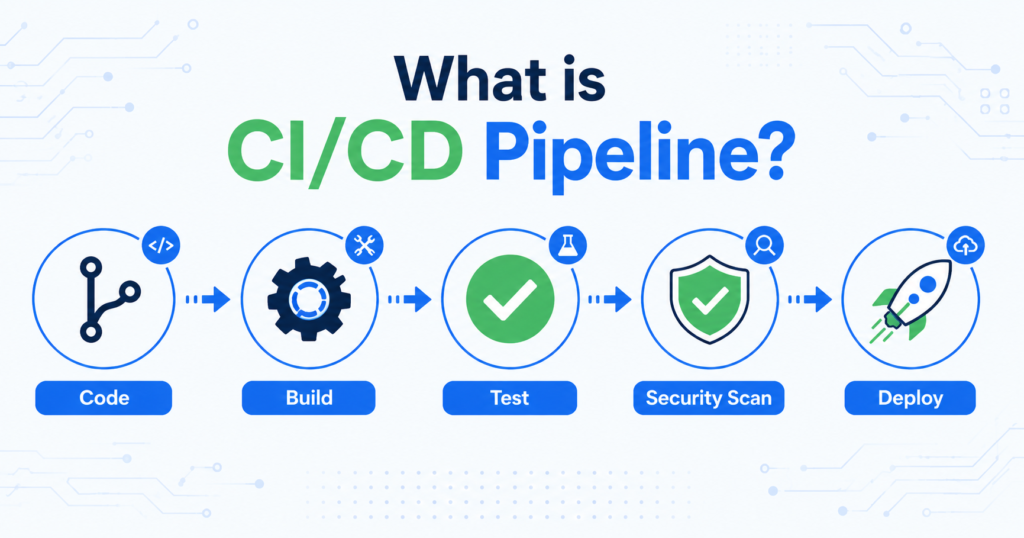
How a CI/CD Pipeline Works: Stage by Stage
A typical CI/CD pipeline has the following stages, each running automatically after the previous one succeeds:
Stage 1: Source
The pipeline is triggered when a developer pushes code to a branch in Git (GitHub, GitLab, or Bitbucket). This is the entry point for the entire pipeline.
Stage 2: Build
The CI tool checks out the latest code and builds the application – compiling source files, downloading dependencies, and creating a runnable artifact (a JAR file for Java, a Docker image for containerized applications, etc.).
Stage 3: Test
Automated tests run against the build. This typically includes unit tests (testing individual functions), integration tests (testing how components work together), and code coverage checks. If any test fails, the pipeline stops immediately and the developer is notified.
Stage 4: Code Quality and Security Scan
This is where security enters the pipeline – what makes a traditional CI/CD pipeline into a DevSecOps pipeline. Tools like SonarQube perform static code analysis, flagging security vulnerabilities, code smells, and potential bugs before they reach production.
Stage 5: Package and Containerize
The tested and approved build is packaged into a Docker container – creating a consistent, portable unit that can be deployed identically to any environment.
Stage 6: Deploy to Staging
The container is deployed to a staging or pre-production environment that mirrors production as closely as possible. Additional automated tests (end-to-end tests, performance tests) run here.
Stage 7: Deploy to Production
If all previous stages pass, the application is deployed to the live production environment – either automatically (Continuous Deployment) or after a manual approval step (Continuous Delivery).
CI/CD Pipeline Tools You Need to Know
Different tools handle different parts of the CI/CD process. Here are the ones that appear most frequently in Hyderabad DevOps job descriptions in 2026:
| Tool | Category | Used For |
|---|---|---|
| Jenkins | CI/CD Server | Building pipelines, most common in Hyderabad MNCs |
| GitHub Actions | CI/CD | Modern, cloud-native pipelines inside GitHub |
| GitLab CI/CD | CI/CD | End-to-end pipeline within GitLab repositories |
| Docker | Containerization | Packaging applications for consistent deployment |
| Kubernetes | Orchestration | Managing containers in production at scale |
| SonarQube | Code Quality | Static code analysis and security scanning |
| ArgoCD | CD (GitOps) | Kubernetes-native continuous deployment |
| Terraform | IaC | Provisioning cloud infrastructure in the pipeline |
For beginners, start with Jenkins (most widely used in Hyderabad MNCs) or GitHub Actions (easier to learn, increasingly preferred by startups and product companies). Master one completely before adding others.
Building Your First CI/CD Pipeline: A Simple Example
Here is what a basic GitHub Actions pipeline looks like for a Python application. This YAML file lives in your repository at .github/workflows/ci.yml:
name: CI Pipeline
on:
push:
branches: [ main ]
jobs:
build-and-test:
runs-on: ubuntu-latest
steps:
– name: Checkout code
uses: actions/checkout@v3
– name: Set up Python
uses: actions/setup-python@v4
with:
python-version: ‘3.11’
– name: Install dependencies
run: pip install -r requirements.txt
– name: Run tests
run: pytest
– name: Build Docker image
run: docker build -t my-app:latest .
Here is what happens when you push code to the main branch:
- GitHub detects the push and automatically triggers the pipeline.
- The pipeline runs on a fresh Ubuntu server – no manual setup required.
- It checks out your code, installs Python, installs dependencies, runs your tests, and builds a Docker image.
- If the pytest tests fail, the pipeline stops and GitHub marks the commit with a red X – visible to the entire team immediately.
- If everything passes, a green checkmark appears and the image is ready for deployment.
This entire process takes 2–4 minutes and runs automatically every single time someone pushes code.
CI/CD in Hyderabad’s Job Market: What Employers Actually Expect
Based on 2026 job postings across Naukri, LinkedIn, and direct company career pages for Hyderabad, here is what employers specifically look for:
Fresher and junior level (0–2 years):
- Understanding of what CI/CD means and why it matters
- Ability to explain the stages of a pipeline in an interview
- Basic hands-on experience with Jenkins or GitHub Actions (even personal projects count)
- Familiarity with Git branching strategies
Mid-level (2–5 years):
- Experience building CI/CD pipelines from scratch
- Integration of Docker into the pipeline
- Knowledge of test automation and coverage metrics
- Security scanning integration (SonarQube)
- Deployment to cloud platforms (AWS, Azure)
Senior level (5+ years):
- Design of enterprise-grade pipelines with multiple stages and approval gates
- GitOps workflows using ArgoCD or Flux
- Pipeline optimization for speed and reliability
- Multi-environment deployment strategies (blue-green, canary)
For freshers in Hyderabad who are trying to break into DevOps, having even one personal CI/CD pipeline project on GitHub – with a working YAML file and visible test results – is a significant differentiator in interviews.
Common CI/CD Mistakes Beginners Make
- Only knowing the theory without building anything. CI/CD is one topic where theoretical knowledge alone will not get you past the interview stage. Build a pipeline for any project – even a simple Python script or a web app.
- Not understanding why tests matter. CI without automated tests is just automation without quality gates. Understanding what unit tests and integration tests do is a prerequisite for meaningful CI/CD work.
- Skipping security stages. Many beginners build pipelines that just build and test, skipping code quality and security scanning. In 2026, DevSecOps integration is an expected part of pipeline design – not an advanced topic.
- Not version-controlling the pipeline file itself. Your YAML pipeline configuration should live in the same Git repository as your code – not be created manually in a tool’s UI. This is a basic professional practice that interviewers check.
Frequently Asked Questions
Is CI/CD only for large companies?
No. CI/CD is useful for projects of any size – even solo developers benefit from automated testing that catches bugs before they reach production. In 2026, even small startups in Hyderabad implement basic CI/CD pipelines from day one.
Do I need to know Docker before learning CI/CD?
Docker knowledge makes CI/CD significantly more practical and is expected for most Hyderabad DevOps roles. We recommend learning Docker basics before building your first pipeline – it makes the packaging and deployment stages much clearer.
Jenkins vs GitHub Actions – which should I learn first?
For Hyderabad MNC jobs (TCS, Wipro, Infosys, Cognizant), Jenkins is still the dominant tool. For startups and product companies, GitHub Actions is increasingly standard. Learn Jenkins first for maximum employability, then add GitHub Actions – the core pipeline concepts are the same across both.
Can a non-developer learn CI/CD?
Yes. Operations engineers, testers, and even system administrators regularly transition into DevOps roles with strong CI/CD skills. The prerequisite is comfort with command-line tools and basic scripting – not full-stack development experience.
How long does it take to learn CI/CD well enough for a job interview?
With hands-on practice, most beginners can build and explain a working CI/CD pipeline within 3–4 weeks of focused learning. The key is building something real – not just watching tutorials.
Conclusion
CI/CD pipelines are one of the most important practical skills in the 2026 Hyderabad IT job market — and they are also one of the most straightforward to learn through hands-on practice.
The concept is simple: automate the path from code to production. The implementation is where the learning happens. Start with GitHub Actions on a personal project this week. Push some code, watch the pipeline run, intentionally break a test and see what happens. That thirty minutes of hands-on experience will teach you more than hours of reading about it.
If you are building toward a DevOps or DevSecOps career in Hyderabad and want structured guidance through CI/CD, Docker, Kubernetes, cloud deployment, and security integration – all with real lab access – Greatcoder’s DevSecOps with Multi-Cloud AI program covers the complete pipeline from code to production. Book a free demo class to get started.